Whatsapp icon

How Google Nest WiFi Fixes Home WiFi Dead Zones

A Kenya guide to choosing Google Nest WiFi for better coverage: when a router is enough, when to add a point, and what to check before buying.


Umoja Marketplace logo
Admin

Published on 30 Sep, 2026


How Google Nest WiFi Fixes Home WiFi Dead Zones | Umoja Marketplace

Slow WiFi is often a coverage problem rather than an internet-plan problem. Concrete walls, long corridors and rooms far from the router can leave a good connection feeling unreliable in exactly the places where you work, stream or take calls.

Explore Umoja’s Google range and compare the current options below before ordering.

Diagnose the dead zone before buying mesh equipment

A weak Wi-Fi signal and a slow internet connection are different problems. Mesh equipment can help distribute your home network, but it cannot turn a failing provider connection into a reliable one. Begin with a simple comparison: test the connection beside your existing router, then in the room where you have trouble. Repeat with the same device at a similar time. If both locations are poor, investigate the service or main router before assuming an additional wireless point is the solution.

Also compare Wi-Fi with a wired connection where practical. If wired service is stable while a distant room struggles, wireless coverage is a more likely issue. If only one device performs badly, its settings or hardware may be involved. The purpose of these tests is not to conduct a laboratory benchmark; it is to identify what needs improvement. Buying a Nest Wifi kit becomes easier when you know whether you need wider coverage, better placement or help from your internet provider.

What a mesh system adds

A mesh system uses connected devices to extend coverage through the home. Instead of relying on one router reaching every room, you place compatible units where they can communicate effectively and serve nearby devices. That can be useful in a long apartment, a house with several rooms or a home office away from the internet entry point. Physical construction and placement still matter, so no advertised coverage area should be treated as a guarantee for your particular building.

Concrete walls, metal objects and awkward floor plans can interrupt radio signals. An additional unit needs a usable connection back into the network. Placing it at the very end of a completely dead zone can therefore be ineffective. The usual goal is to position it between the main unit and the weak area, where it can still receive a strong enough link. Test and adjust rather than assuming the first convenient socket is the ideal location.

Google Wifi, Nest Wifi and Nest Wifi Pro

These names refer to different product generations. Do not buy an add-on merely because it has Google or Nest in its name. Compatibility determines whether it can join your existing mesh. Google's official guidance states that Nest Wifi Pro does not mesh with the earlier Google Wifi and Nest Wifi generations. Confirm the exact products you already own before ordering another unit, and check the intended combination against Google's current support documentation.

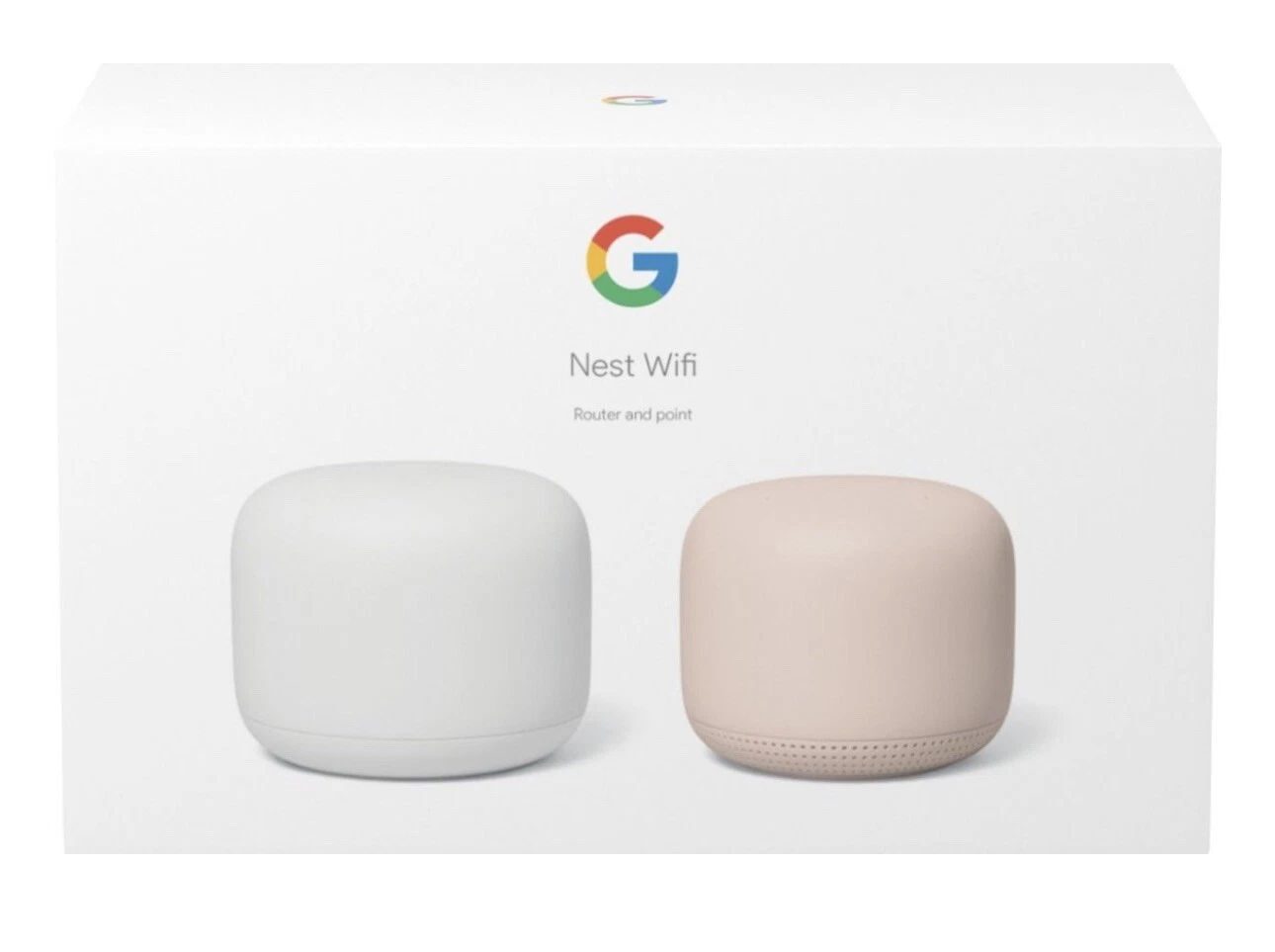
Within the earlier Nest Wifi range, a router and a point are not necessarily the same hardware. Their ports and roles can differ. A point should not be assumed to replace the main router or provide a wired port for your desktop. Ask what is included in the kit: one router, one or more points, the adapters and any cables. Clear item descriptions prevent buying an accessory that cannot perform the role you intended.

Your provider's modem or fibre equipment still matters

Nest Wifi does not replace every piece of equipment supplied by an internet provider. The connection may still need an optical terminal, modem or a particular authentication arrangement. Before installation, ask your provider how an additional router should be connected. If their existing device is already routing, adding another router can create a double-router arrangement. That may be acceptable for some uses but can complicate certain applications and troubleshooting.

Where a bridge mode or another change is recommended, follow the provider's instructions rather than changing settings blindly. Keep the details needed to restore the original arrangement if necessary. If the connection serves a small office, plan installation for a time when an interruption will not disrupt essential work. A mesh upgrade should improve the connection people use, and that includes making a careful transition from the old configuration.

Placement has more influence than extra units

Start with the main router in an open position, away from enclosed cabinets and large metal surfaces. The provider's cable location may constrain you, but extending a suitable Ethernet connection can sometimes produce better placement. Put the next unit within useful range of the main router and test the mesh connection with Google's tools. A central location may serve two weak rooms better than placing one unit deep inside either room.

For a multi-floor home, think about how the units connect through the building, not simply how many square metres each floor contains. Stairways or open areas may offer a better path than a thick slab and several internal walls. Move a unit a short distance and test again if performance is disappointing. More units are not automatically better: poorly positioned devices can add complexity without solving the connection between them.

Wireless and wired connections

Where compatible hardware provides Ethernet, a wired connection can be valuable for a desktop, television or other stationary equipment. It can also support certain mesh arrangements, but verify the ports and topology supported by your exact units. An earlier Nest Wifi point should not be assumed to provide Ethernet just because the router does. Read the hardware specifications before planning cable routes or buying a network switch.

For a permanent cable installation, use appropriate cable and have the route planned safely. Avoid loose leads across doorways and staircases. If you rent, a removable arrangement may make more sense than drilling through walls. Balance the practical installation cost against the benefit: a direct cable to one demanding workstation can sometimes solve the main problem without replacing the entire network. Mesh is one useful tool, not the only way to improve a home connection.

What mesh can and cannot improve

A better local wireless connection can reduce interruptions caused by weak coverage, but the internet package still limits the connection shared by the household. Several simultaneous video calls, streaming sessions and large downloads compete for available capacity. If the service itself is insufficient, discuss an appropriate package with your provider. A new router cannot supply bandwidth the provider is not delivering.

Similarly, a mesh system cannot guarantee the performance of every old phone or laptop. Device capabilities, interference and the application being used all influence results. Measure the tasks that matter: a call from your study, a stream in the sitting room and a download on the work computer. Those outcomes are more useful than a single impressive speed-test result beside the router. Keep notes on which changes improve the troublesome location.

Setup, account access and regional considerations

Google provides setup through its supported app and account process. Check the current requirements for the exact generation, including app compatibility, account access and connectivity. Use an account controlled by the household or business that will manage the network. If a technician sets it up for you, make sure you retain the appropriate access rather than leaving the entire system dependent on their personal account.

Imported networking equipment deserves additional checking. Google's support documentation notes that wireless regulations and support conditions vary by country. Confirm the region of the supplied hardware and whether it is appropriate for your intended installation in Kenya. Do not assume that every imported kit is locally supported simply because it powers on. Get clear information about the seller's support arrangements and use the correct power adapters supplied for the units.

Practical household examples

In a long apartment, put the main router where it can serve the near rooms and place a compatible additional unit where the link remains strong toward the distant bedroom. Test a call in that bedroom after adjustment. For a two-storey house, try a connection path near the stairwell before pushing units into opposite corners. The building's construction determines whether that path works, so check the result in the spaces people actually use.

In a home office, the priority may be one reliable desk connection. A cable or better-positioned main router may be enough. For a family with many devices, discuss who uses the network and when: scheduling a large download outside a work call can improve the experience without extra hardware. Equipment, placement and usage habits all belong in the plan.

A sensible buying checklist

Before ordering, identify your existing router, provider equipment, building layout and weak locations. Confirm the exact Nest generation, the contents of the kit, add-on compatibility and available Ethernet ports. Ask about region and support. Use Umoja's live product pages for current availability and Google's placement guidance and setup instructions for the technical process.

After installation, revisit the same locations and tasks used in your original tests. A useful upgrade should make the distant room more dependable, not merely produce a faster measurement beside the new router. Keep the setup details and a record of your final device placement so that future changes can be assessed methodically. That makes the home network easier to live with and easier to troubleshoot when the next problem appears.

Current Umoja options

Shop the shortlist

Better coverage comes from good placement and the right number of points, not from adding hardware blindly. Match the setup to the layout you live in.

Before checkout, review Umoja’s Delivery Policy, Return Policy and the exact product configuration you selected.

Related buying guides


Umoja Marketplace logo
Admin

Published on 30 Sep, 2026


Read next

Fast & Secure Delivery

Same-day available in Nairobi.

Genuine Products

Sourced from official distributors.

Easy Returns

On faulty, wrong or damaged items.

Pro Quality Support

Call & WhatsApp: Mon–Fri 8am–8pm, Sat 10am–2pm, Sun closed.